Generate Summary
Create a formatted text summary of your itinerary to share with customers.
Navigate to: Summary tab
What is a Summary?
A summary converts your structured itinerary (all the sections, activities, accommodations, transfers, flights you created in the Itinerary tab) into formatted text that's easy to share via WhatsApp, email, or SMS.
The summary is generated from your saved itinerary entities. Make sure you've saved all changes in the Itinerary tab before generating a summary.
Generate with AI
Steps:
-
Click Generate with AI button
-
Choose a summary style:
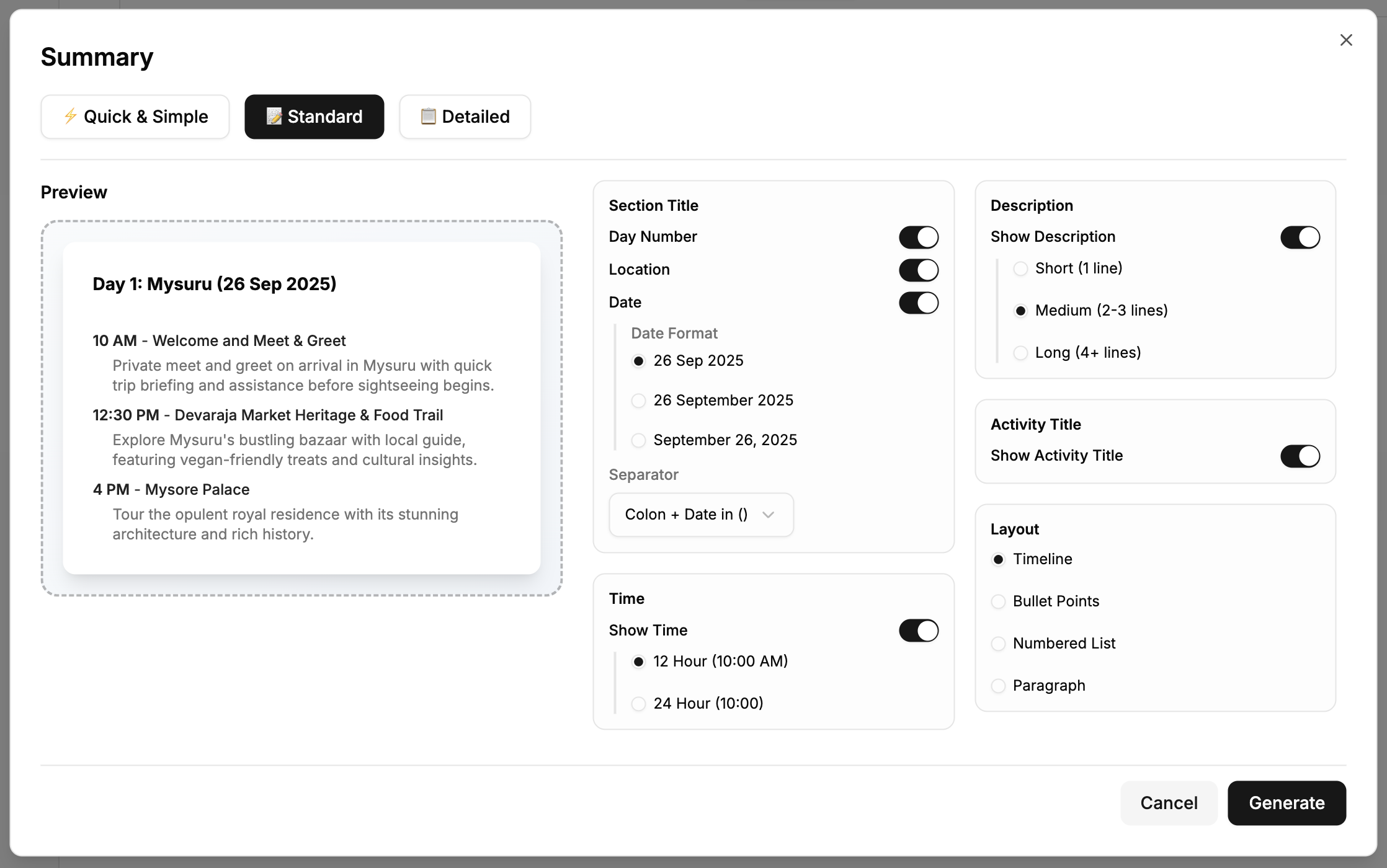
⚡ Quick & Simple - Just activities and times 📝 Standard - Activities with brief details (Recommended) 📋 Detailed - Full descriptions for each activity
- Customize format (optional):
What to include:
- Day numbers, locations, dates in section titles
- Activity times (12-hour or 24-hour format)
- Activity titles
- Activity descriptions (short/medium/long)
Layout style:
- Timeline (default list)
- Bullet points
- Numbered list
- Paragraph format
-
Watch the Preview update as you adjust settings
-
Click Generate
AI converts your itinerary into formatted text (~30-60 seconds)
What Gets Included
The summary includes everything you saved in your itinerary:
✅ Trip title and duration ✅ Accommodations (if added) ✅ Flights (if added) ✅ Transportation - trains/buses (if added) ✅ All day sections with their activities ✅ Transfers between locations ✅ Meals and other activities ✅ Unscheduled items
The AI uses exactly what's in your saved itinerary - no additions, no omissions. Empty sections are automatically skipped.
Example Output
Your itinerary in Itinerary tab:
- Section: Day 1 - Seminyak
- Activity: Uluwatu Temple at 4:00 PM
- Activity: Jimbaran Seafood Dinner at 7:00 PM
- Section: Day 2 - Ubud
- Accommodation: W Seminyak (3 nights)
Generated summary (Standard format):
Bali Beach & Culture Escape
7 days, 6 nights

Accommodations
- W Seminyak - 3 nights

Day 1: Seminyak (26 Sep 2025)

4:00 PM - Uluwatu Temple
Visit clifftop temple at sunset with Kecak Dance performance

7:00 PM - Jimbaran Seafood Dinner
Beachfront dining with fresh catch of the day

Day 2: Ubud (27 Sep 2025)
...
Edit Your Summary
After generation, you can:
- Edit any text in the editor
- Add personal notes
- Adjust descriptions
- Remove sections you don't want to share
Save Your Summary
Click Save to preserve your summary with the itinerary.
Once saved, the Share via WhatsApp feature becomes available.
Share via WhatsApp
After saving your summary:
- Click Share via WhatsApp button
- The summary text is ready to copy
- Paste into WhatsApp and send to your customer
Or use the Share tab's WhatsApp Quick Share:
- The saved summary is automatically included in the WhatsApp message
- One-click sharing with pre-filled text + itinerary link
Save your summary, then use WhatsApp Quick Share from the Share tab for instant sending with both summary text and interactive link.
Regenerating Summary
Made changes to your itinerary?
- Save changes in the Itinerary tab
- Return to Summary tab
- Click Generate with AI again
- Choose format and generate
- Save the updated summary
The AI creates a fresh summary based on current itinerary data.
Tips
Format Selection:
- Use Standard for most cases - balanced detail
- Use Quick & Simple for brief proposals
- Use Detailed for comprehensive packages
Before Generating:
- Make sure itinerary is complete and saved
- Review all entities in Itinerary tab
- Check that sections are in correct order
After Generating:
- Proofread the text
- Add any personal touches
- Remove internal notes not meant for customers
- Save before sharing
Next: Link Customers →