Calculate Pricing
Manage costs and calculate profitable pricing for your itineraries.
Navigate to: Pricing tab
Step 1: Create a Pricing Plan
Before you can add costs, create a pricing plan first.
Steps:
- Click Create Plan button
- Enter a plan name (e.g., "Standard Bali Package", "Budget Option", "Luxury Experience")
- Optionally import costs from an existing plan
- Click Create
Your new pricing plan opens with empty cost components.
You can create multiple pricing plans for different customer segments. For example: "Budget Bali" and "Luxury Bali" for the same itinerary.
Step 2: Add Your Cost Components
Now scroll to the bottom of the page to add all your expenses.
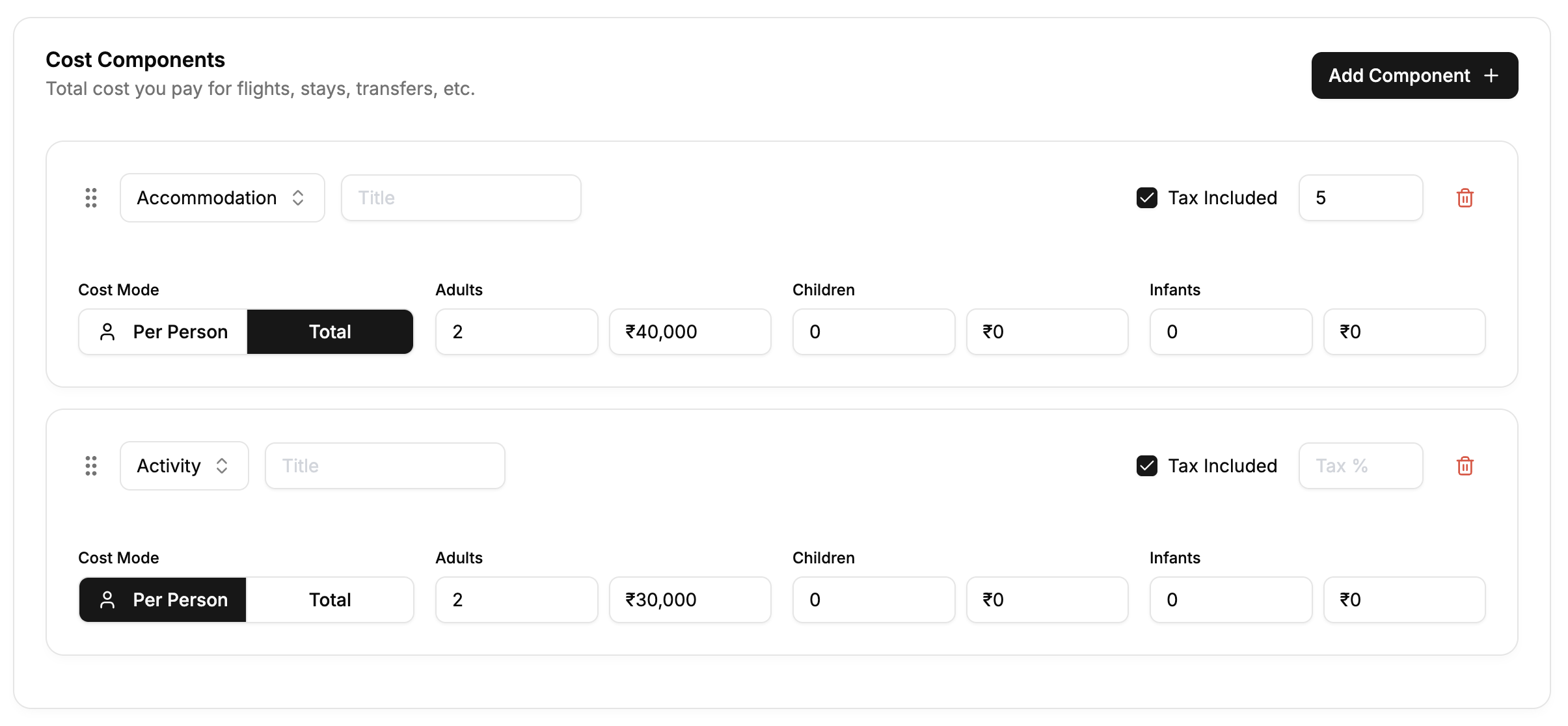
Click Add Component + to add each cost item.
Available Categories:
- Flight - Airfare costs
- Accommodation - Hotels, resorts, vacation rentals
- Activity - Tours, experiences, sightseeing, attractions
- Transfer - Ground transportation (airport transfers, private cars, shuttles)
- Bus - Bus travel and coach services
- Train - Rail travel and train tickets
- Others - Meals, insurance, guide fees, entrance tickets, miscellaneous expenses
- Overall - Package costs or bundled expenses that apply to the entire trip
Choose the category that best matches your cost. The system uses these to organize expenses and calculate per-person breakdowns accurately.
Choose the category that best matches your cost. The system uses these to organize expenses and calculate per-person breakdowns accurately.
Cost Entry Options:
For each component, choose how to enter costs:
Option 1: Per Person
Enter the cost per person for each category:
- Adults - Cost per adult traveler
- Children - Cost per child traveler
- Infants - Cost per infant traveler
Example: Uluwatu Temple tour with Kecak Dance
- Adults: ₹3,000 per person
- Children: ₹2,000 per person
- Infants: ₹0
Toggle: Per Person selected
Option 2: Total Amount
Enter the total cost and how many people in each category:
- Adults - Number of adults + Total cost for all adults
- Children - Number of children + Total cost for all children
- Infants - Number of infants + Total cost for all infants
Example: Private villa in Ubud (₹40,000 total for 3 nights)
- 2 Adults: ₹40,000 total
- 0 Children: ₹0
- 0 Infants: ₹0
- System calculates: ₹20,000 per adult
Toggle: Total selected
Tax Handling:
For each cost component:
Tax Included ☑ Check this if the supplier's quoted price already includes tax (Common for hotel rates that include taxes)
Tax % If tax is NOT included, enter the tax rate (e.g., 5% tourism tax, 10% service charge)
- Tax Included checked: System extracts the tax amount from the total
- Tax Included unchecked: System adds the tax on top of the base price
Build Your Complete Cost List
Add components for everything:
Example: 7-Day Bali Honeymoon
| Component | Category | Details | Cost |
|---|---|---|---|
| Flights | Flight | Return airfare Mumbai-Bali | ₹25,000 per person |
| W Seminyak | Accommodation | 3 nights with breakfast | ₹21,000 total |
| Kayon Ubud | Accommodation | 3 nights with breakfast | ₹21,000 total |
| Airport Transfer | Transfer | Private car with meet & greet | ₹2,500 total |
| Ubud Transfer | Transfer | Private car Seminyak to Ubud | ₹3,000 total |
| Return Transfer | Transfer | Private car Ubud to airport | ₹2,500 total |
| Uluwatu Temple | Activity | Sunset + Kecak Dance | ₹3,000 per person |
| Rice Terraces | Activity | Tegalalang with swing | ₹2,500 per person |
| Cooking Class | Activity | Paon Bali half-day | ₹4,000 per person |
| Spa Session | Activity | 90-min couples massage | ₹5,500 per person |
| Jimbaran Dinner | General | Seafood dinner at Menega Cafe | ₹3,000 per person |
| Locavore Dinner | General | Fine dining in Ubud | ₹6,000 per person |
Keep adding components until you've itemized all your costs.
Step 3: Configure Your Pricing
Once you've added all costs, scroll back to the top to configure your profit and pricing.
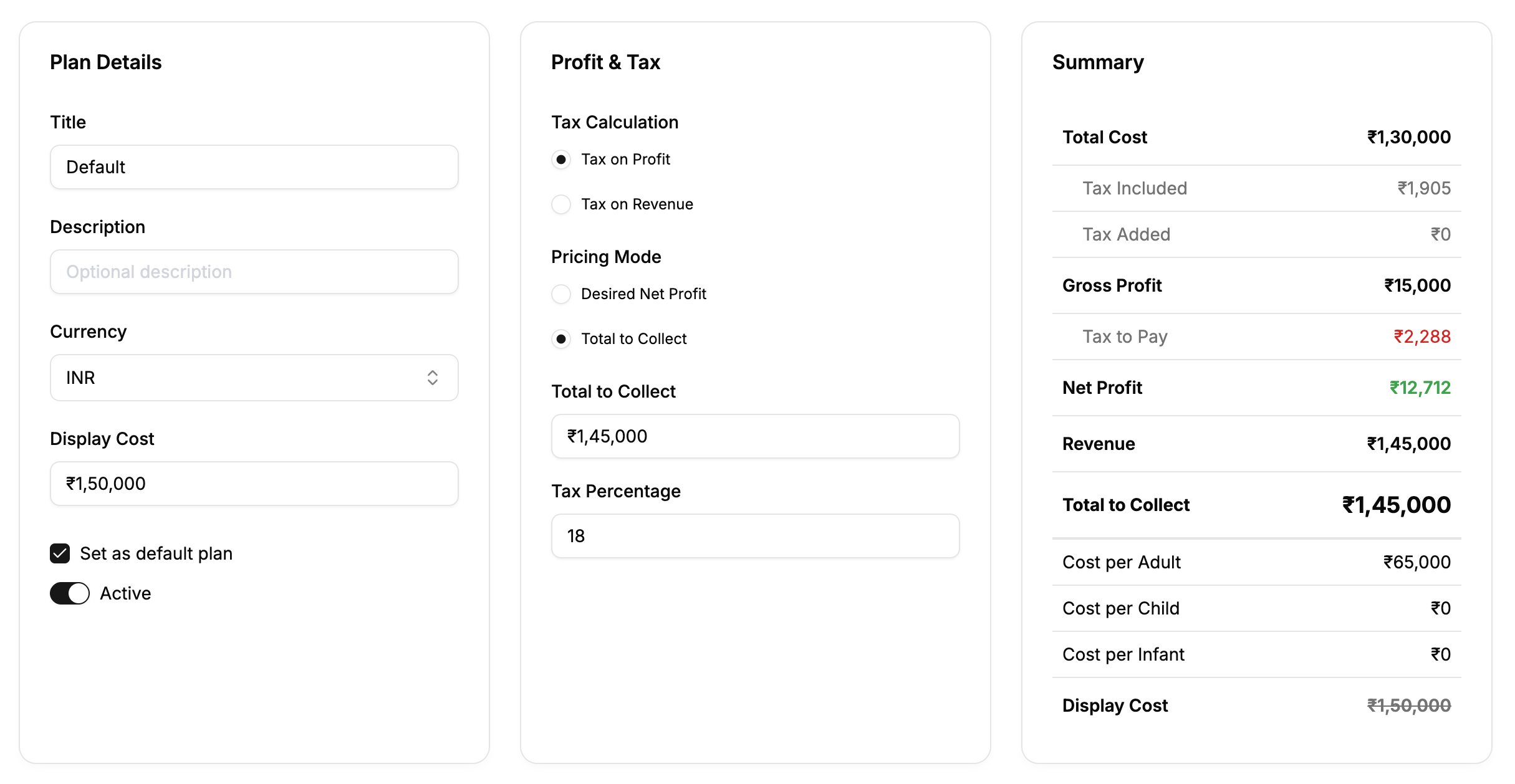
As you configure, watch the Summary panel on the right update in real-time.
Plan Details (Left Card)
Title Your plan name (already set when you created it)
Description (Optional) Add details: "Includes 4-star hotels, private driver, all activities"
Currency INR, USD, EUR, etc. (changes all amounts)
Display Cost (Optional) We'll set this after calculating the final price
Set as default plan ☑ Check if this should be the primary plan shown to customers
Active toggle Turn on/off customer visibility
Profit & Tax (Center Card)
Now calculate your pricing using one of two modes:
Tax Calculation
Choose how tax is calculated:
○ Tax on Profit (Most Common) Tax only applies to your profit portion
○ Tax on Revenue Tax applies to entire revenue (cost + profit)
"Tax on Profit" is the standard approach. Tax is calculated on your profit margin, not on supplier costs you're passing through.
Pricing Mode
Choose your calculation method:
Option A: Desired Net Profit
Tell the system your target profit:
-
Select "Desired Net Profit" radio button
-
Choose input mode:
- ₹ button - Enter fixed amount (₹15,000)
- % button - Enter percentage (10%)
-
Enter your desired net profit
-
Enter Tax Percentage (e.g., 18% GST)
Example:
Total Cost shown in summary: ₹1,30,000
Your input:
- Desired Net Profit: 10% (system calculates ₹13,000)
- Tax Percentage: 18%

System calculates:
- Gross Profit: ₹15,340
- Tax to Pay: ₹2,340
- Net Profit: ₹13,000
- Total to Collect: ₹1,45,340
Watch the Summary panel update as you enter values!
Option B: Total to Collect (Recommended)
Enter the exact amount you want to collect:
-
Select "Total to Collect" radio button
-
Enter Total to Collect (e.g., ₹1,45,000)
-
Enter Tax Percentage (e.g., 18%)
Use this when:
- You want a round number (₹1,45,000 instead of ₹1,45,340)
- Customer has a fixed budget
- You want to match competitor pricing
Example:
Total Cost shown in summary: ₹1,30,000
Your input:
- Total to Collect: ₹1,45,000 (nice round number!)
- Tax Percentage: 18%

System calculates:
- Gross Profit: ₹15,000
- Tax to Pay: ₹2,288
- Net Profit: ₹12,712
The system works backward to show your actual profit!
Use "Total to Collect" to create clean, round numbers. ₹1,45,000 looks more professional than ₹1,45,847.
Understanding the Summary (Right Card)
Watch these values update in real-time as you configure:
Total Cost - All your expense components ├─ Tax Included - Taxes already in supplier quotes └─ Tax Added - Taxes added on top
Gross Profit - Your profit before paying taxes
Tax to Pay - Tax you need to remit (shown in red)
Net Profit - Your actual profit after all taxes (shown in green)
Revenue - Total Cost + Net Profit
Total to Collect - Final amount to charge customer
Cost per Adult/Child/Infant - Individual breakdowns
Display Cost - The "original" price (we'll set this next)
Step 4: Set Display Cost (Optional)
Now that you know your "Total to Collect", you can optionally set a higher "Display Cost" to show a discount.
In the Plan Details card, enter Display Cost:
Example 1: Show a Discount
Total to Collect: ₹1,45,000
Display Cost: ₹1,60,000

Customer sees:
₹1,60,000 (crossed out) → ₹1,45,000
"Save ₹15,000!"
Example 2: Early Bird Special
Total to Collect: ₹1,45,000
Display Cost: ₹1,55,000

Message: "Book before March 31 and save ₹10,000!"
Example 3: No Discount
Total to Collect: ₹1,45,000
Display Cost: (leave empty)

Customer sees:
₹1,45,000 (regular price)
Showing a higher original price creates perceived value. ₹1,60,000 crossed out makes ₹1,45,000 feel like a great deal, even though ₹1,45,000 was always your intended price.
Step 5: Save Your Pricing Plan
Click Save button in the top-right after configuring everything.
Keyboard shortcut: Cmd+S (Mac) or Ctrl+S (Windows)
The system shows "Unsaved Changes" if you have pending edits.
Creating Multiple Pricing Plans
You can create multiple plans for the same itinerary.
Example: Bali Itinerary - Three Pricing Tiers
Budget Plan (₹95,000)
- 3-star hotels and guesthouses
- Shared airport transfers
- Group tours only
- Local restaurants
- Profit margin: 10%
Standard Plan (₹1,45,000) ⭐ Default
- 4-star hotels (W Seminyak, Kayon Ubud)
- Private driver throughout
- Mix of group and private tours
- Mix of local and nice restaurants
- Profit margin: 15%
Luxury Plan (₹2,75,000)
- 5-star resorts (Hanging Gardens, Bulgari Resort)
- Private driver with assistant
- All private tours and experiences
- Fine dining restaurants
- Profit margin: 20%
To create another plan:
- Click Create Plan again
- Optionally import costs from existing plan
- Modify accommodations, activities to match tier
- Adjust profit margins
- Save
Use the dropdown at the top to switch between plans.
What Customers See
When you share the itinerary, customers see only active plans with:
✅ Plan title (e.g., "Standard Bali Package") ✅ Description (if you added one) ✅ Total to Collect amount ✅ Display Cost (with strikethrough if set) ✅ Currency symbol
Customers DO NOT see:
❌ Your cost breakdown ❌ Profit margins ❌ Tax calculations ❌ Supplier costs ❌ Individual component costs ❌ Inactive plans
All your internal costs, profit calculations, and supplier pricing remain completely private. Customers only see the final package prices.
Complete Example: 7-Day Bali Honeymoon
Let's walk through the entire workflow:
Step 1: Created Plan
Name: "Standard Bali Honeymoon Package"
Step 2: Added Cost Components
| Component | Type | Cost Mode | Amount |
|---|---|---|---|
| Flights | Flight | Per Person | ₹25,000/adult × 2 |
| W Seminyak 3N | Accommodation | Total | ₹21,000 |
| Kayon Ubud 3N | Accommodation | Total | ₹21,000 |
| Transfers (3) | Transfer | Total | ₹8,000 |
| Uluwatu Temple | Activity | Per Person | ₹3,000/adult × 2 |
| Rice Terraces | Activity | Per Person | ₹2,500/adult × 2 |
| Cooking Class | Activity | Per Person | ₹4,000/adult × 2 |
| Spa Session | Activity | Per Person | ₹5,500/adult × 2 |
| Special Dinners (2) | General | Per Person | ₹9,000/adult × 2 |
Total Cost: ₹1,29,000
Step 3: Configured Pricing
Pricing Mode: Total to Collect Total to Collect: ₹1,50,000 (rounded) Tax Calculation: Tax on Profit Tax Percentage: 18%
Result:
- Gross Profit: ₹21,000
- Tax to Pay: ₹3,220
- Net Profit: ₹17,780
- Cost per Adult: ₹75,000
Step 4: Set Display Cost
Display Cost: ₹1,65,000 (to show ₹15,000 savings)
Step 5: Saved
Customer sees:
₹1,65,000 ₹1,50,000
"Standard Bali Honeymoon Package"
₹75,000 per person
Tips for Profitable Pricing
Bali-Specific Considerations
Seasonal Pricing:
- Low Season (Jan-Mar, Oct-Nov): Use standard rates
- High Season (Jul-Aug, Dec-Jan): Add 30-40% to accommodation
- Shoulder Season (Apr-Jun, Sep): Standard rates
Don't Forget:
- Temple entrance donations (₹50-100 per temple)
- Parking fees at popular restaurants
- Gratuities for drivers (₹500-1,000 per day)
- Peak season surcharges from suppliers
- Nyepi Day planning (nothing operates)
Profit Margin Guidelines
By Trip Type:
- Budget trips: 8-12%
- Mid-range: 12-18%
- Luxury: 18-25%
- Custom/unique experiences: 20-30%
By Complexity:
- Simple packages (hotel + airport): 8-12%
- Standard itineraries: 12-18%
- Complex multi-destination: 18-25%
- Fully customized: 20-30%
Best Practices
Round Your Numbers:
- ✅ ₹1,50,000 (looks professional)
- ❌ ₹1,52,847 (looks calculated)
Create Tiers:
- Offer 2-3 pricing options
- Mark one as "Most Popular"
- Show value difference clearly
Use Display Cost Strategically:
- Don't overuse it (looks gimmicky if too high)
- 10-15% difference is realistic
- Match it to real competitor pricing
Be Transparent:
- Description should mention what's included
- Highlight unique value (private guides, special access)
- Make exclusions clear
Saving Your Work
Click Save in the top-right after any changes. The system shows "Unsaved Changes" reminder when you have pending edits.
Keyboard shortcut: Press Cmd+S (Mac) or Ctrl+S (Windows)
Next: Generate Summary →